How would your customers know an email really came from your business and not an attacker pretending to be you?
Email spoofing and phishing scams often work because the sender looks legitimate. Attackers can make messages appear to come from your domain, then use that trust to trick recipients into clicking links, handing over data, or making payments.
DKIM helps protect your business and your recipients by proving that emails sent from your domain are authentic and have not been altered in transit.
What Is DKIM?
DKIM stands for DomainKeys Identified Mail. It is an email authentication method that adds a secure digital signature to messages sent from your domain.
When a receiving mail server checks that signature, it can verify that the email genuinely came from an authorised sender and that the message content has not been tampered with.
Why DKIM Matters for Business Email
The standard protocol used to send email, SMTP, does not include a built-in way to authenticate the sender’s identity. That is one reason email remains a popular method for cyber crime.
By adding DKIM on top of SMTP, you significantly improve the trust and integrity of your email communications.
How DKIM Works in Plain English
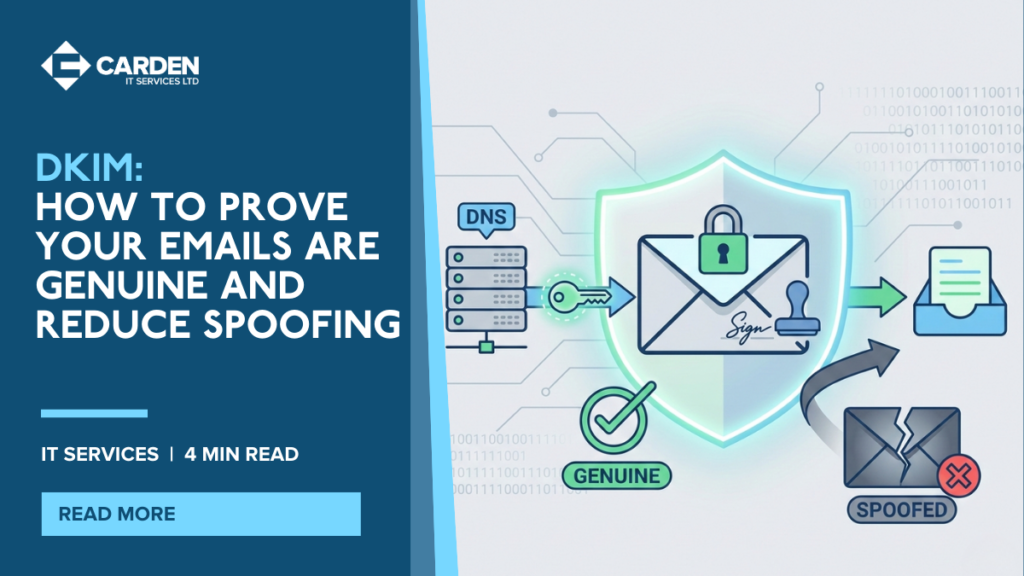
DKIM uses public key cryptography. While the details are technical, the purpose is simple: prove the message is genuine.
In practical terms, the process looks like this:
- A public DKIM key is added to your domain’s DNS records
- When your system sends an email, it adds a DKIM signature to the message header
- The recipient’s mail server checks the DNS record for the public key
- If the key matches the signature, the message is treated as authentic
What DKIM Helps Protect Against
| Threat | How It Happens | How DKIM Helps |
|---|---|---|
| Domain Spoofing | Attackers send emails pretending to be from your domain | Recipients can verify whether emails are truly authorised |
| Phishing Scams | Emails mimic trusted senders to steal data or logins | Improves detection of forged messages |
| Email Tampering | Message content is modified during transit | Invalid signatures indicate messages have been altered |
| Deliverability Issues | Legitimate emails are marked as spam | Supports sender reputation and trust signals |
Does Your Business Need DKIM?
If your organisation sends commercial emails, invoices, customer communications, or staff messages, DKIM should be enabled. It reduces the likelihood that recipients will be tricked by spoofed messages that appear to come from your domain.
However, DKIM works best as part of a complete email authentication setup. For stronger protection, it is important to combine DKIM with SPF and DMARC, so your domain has clear rules about what should happen when verification fails.
How Carden IT Services Helps With DKIM and Email Security
At Carden IT Services, we help businesses implement and manage email authentication properly. This includes DKIM setup, DNS configuration, and ongoing review to make sure your email remains secure and delivers reliably.
Our team can help you:
- Enable DKIM on your email platform
- Publish and validate DNS records correctly
- Reduce spoofing risk without disrupting genuine email delivery
- Align DKIM with your wider email security approach
Protect Your Brand Reputation With Strong Email Authentication
DKIM helps prove your emails are genuine, reduces spoofing, and protects both your business and your recipients from email-based fraud.
If you want to strengthen email security and implement DKIM correctly, contact Carden IT Services today for a consultation or quote.